


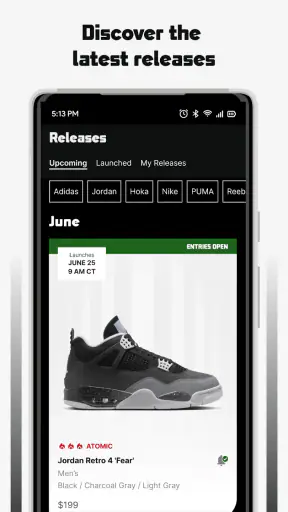
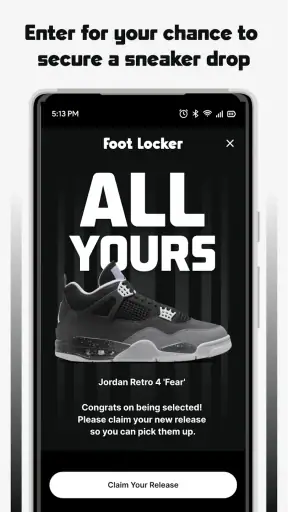
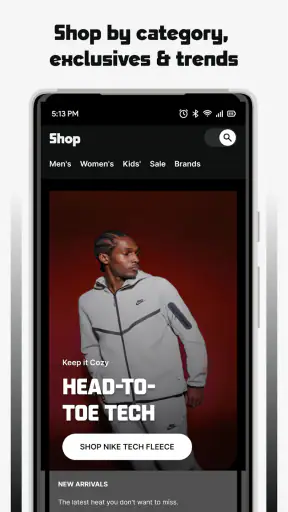
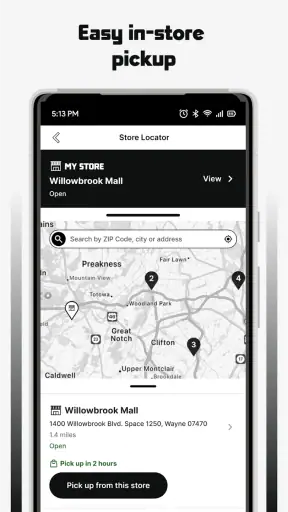
I approached Foot Locker - Shop Releases as I would any shopping app that asks for a place on my phone: not just “Can I find sneakers here?” but also “Do I understand what I am choosing, and can I use it without giving up more control than necessary?” My experience is that this is a focused way to browse Foot Locker’s sneaker catalog and keep an eye on releases, but it works best when I treat it as a retailer-specific shopping tool rather than a complete sneaker marketplace.
The app comes from Foot Locker, Inc. and is free to download. It sits in the shopping category, carries an Everyone content rating, and has been available since March 26, 2015. The current release is version 9.11.0, with support for iOS 9 and later. Those details make it approachable for a wide range of users, including someone using an older compatible Apple device, although the practical experience can still depend on the phone’s age and the app’s current performance.
What interested me most was the balance between convenience and control. A sneaker app can be useful when I already know what I want, but it can also encourage impulsive browsing, repeated notifications, and account creation before I have decided whether the service is worth using. I therefore paid attention to the points where the app helps me make a clear choice, and to the moments where I would want to pause and review my settings.
What the app is really useful for
The main appeal is straightforward: this is a direct shopping channel for Foot Locker releases rather than a general-purpose resale service. I can use it to browse the retailer’s sneaker selection, check products when a new drop is on my radar, and move from discovery toward a purchase without switching between several unrelated apps.
That focus is valuable for a particular kind of shopper. If I already buy from Foot Locker, keeping its catalog in one place is more convenient than repeatedly opening a browser, searching for the retailer, and navigating to the same sections. It is also useful when I want to compare several styles from the same store instead of jumping between brand websites and marketplaces.
On the other hand, I would not use it as my only source for sneaker research. A retailer app naturally shows me that retailer’s inventory and shopping flow. Someone looking for broad price comparisons, used pairs, independent sellers, or resale-market history will usually get a wider view from a marketplace or a standard web search. The app’s strength is a direct Foot Locker experience, not neutral coverage of every possible seller.
The store listing presents it as a source for sneakers, and that description matches the way I would position it in everyday use: a place to check what Foot Locker is offering, especially when releases matter to me. I would install it for access to the store’s own shopping environment, not because I expect it to replace every sneaker-related tool on my phone.
How I would use it before buying
My preferred workflow starts with browsing rather than immediately signing in or buying. I first look through the available products and decide whether the app is actually saving me time. This matters because a free download is not automatically a free-flowing experience; the real cost can be attention, notifications, and the effort of managing another account.
For a planned purchase, I would make a short list before opening the app: the model, preferred color, size, and a sensible spending limit. That simple preparation prevents the release-focused design from turning into aimless scrolling. It also gives me a way to judge the app fairly. If it helps me find the exact pair quickly, it is doing its job. If I am still searching without a clear decision, I may be better off comparing the same product elsewhere.
A realistic example would be a Saturday morning when I notice that my everyday sneakers are wearing out. I might open the app, browse Foot Locker’s current selection, check whether a suitable style is available, and then compare the final choice with the brand’s own sizing guidance or a second retailer. The app is helpful in the first part of that process, but I would not assume that the first attractive product is automatically the best value or fit.
One practical tip is to separate discovery from checkout. I can save the product details I need, step away, and return with a clearer decision instead of treating every interesting release as urgent. That is especially important for limited or highly anticipated products, where excitement can make ordinary questions—fit, return conditions, delivery expectations, and total cost—feel less important than they should.
Trust starts with visible choices
For me, trust in a shopping app is not created by a polished interface alone. I want to see what the app asks me to do, which choices are optional, and whether I can change my mind later. With a retailer app such as this one, the most important control points are the account, notifications, checkout, and any device-level permission prompts.
I recommend reading each permission request instead of accepting everything automatically. If a permission is needed for a specific action, I can decide at that moment whether the benefit is worth it. If I am only browsing, I prefer to postpone optional access until I understand why I would use it. This is a better habit than granting broad access simply because I want to see the catalog.
The same principle applies to notifications. Release alerts can be useful when I am watching a particular launch, but they can become distracting if I enable every available update. I would begin with the narrowest notification setup that supports my goal, then adjust it through the app or the phone’s settings. A good shopping routine is one where I can turn attention on for a purpose and turn it off afterward.
I also distinguish between using the app to browse and using it to buy. Browsing may require little personal input, while checkout naturally involves more sensitive information. Before entering details, I would review the order summary carefully, including the selected size, delivery information, and final amount shown at checkout. This is not a criticism unique to Foot Locker; it is simply where a shopping app deserves the closest attention.
Account control and the moments that need care
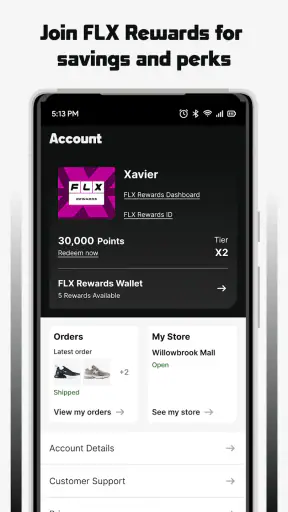
An account can make repeat shopping easier, but it also creates another place where personal information and purchase history may be connected. I would create one only when it provides a clear benefit, such as making a planned purchase easier or helping me manage an order. If I am only exploring styles, I would avoid rushing into registration before I know I will return.
When I do use an account, I would keep its details current and review the available account settings from time to time. That includes checking communication preferences, confirming that saved information is still accurate, and removing anything I no longer want stored if the app gives me that option. These small checks are more useful than assuming that a retailer will always choose the settings I would have chosen.
Data-sensitive moments are not limited to payment. Searching for products, viewing releases, saving preferences, receiving alerts, and completing an order can all shape the experience I see later. I do not need to treat ordinary browsing as dangerous, but I do want to understand when I am moving from casual exploration into an identifiable shopping session.
My advice is to avoid entering payment or delivery information while distracted or connected to an unfamiliar public device. I would also check the order confirmation before closing the app and keep the confirmation available until the purchase is resolved. That workflow gives me a clear record and makes it easier to notice a mistake early.
There is another trade-off worth mentioning: convenience often depends on keeping the app signed in or allowing it to remember choices. That can make repeat purchases faster, but it may be less suitable on a shared phone. On a personal device, I might accept some convenience after reviewing the controls. On a family tablet or borrowed phone, I would be much more cautious and sign out when finished.
Where this app beats the usual alternatives
Compared with opening Foot Locker in a mobile browser, the app can feel more direct for regular shoppers because it is already installed and centered on the retailer’s sneaker experience. I do not have to remember the website path each time, and a dedicated app is easier to keep available when I am monitoring a release.
Compared with a brand-only app, Foot Locker can be more useful when I want to browse across the retailer’s sneaker offering rather than stay within one manufacturer’s range. That makes it a better fit for shoppers who compare several brands in one session.
Compared with resale marketplaces, its role is different. A marketplace may offer more seller variety or secondhand choices, while this app is better suited to someone who wants the retailer’s own shopping route. I would choose the marketplace when price history, used condition, or seller comparison matters more than a direct store experience.
Compared with price-comparison tools, the Foot Locker app is more convenient for completing a purchase within the same retail environment, but less useful as an impartial survey of the market. I would use both when the item is expensive or when availability differs widely between stores. The extra few minutes of comparison can prevent me from confusing convenience with the best deal.
Performance, expectations, and everyday friction
The app’s long availability and broad adoption suggest that it is not an obscure experiment. It has an average rating of 4.3 from around 67 thousand ratings, with roughly 19 thousand written reviews, and it has passed 5 million installs. I read those figures as signs that many people find a reason to keep it around, but not as proof that every shopper will have the same experience.
Ratings can hide differences in expectations. A frequent Foot Locker customer may value quick access to releases, while an occasional visitor may find an account or notification flow unnecessary. A person with a newer phone may also judge responsiveness differently from someone using older hardware. I would therefore treat the rating as useful context, then decide based on my own shopping habits.
The app is free, which removes the usual trial-cost barrier. Still, free shopping apps can encourage more frequent browsing than I intended, so I would use a simple rule: open it with a specific purpose. For example, I might check a release, compare a few styles, or follow up on an order. If I find myself opening it repeatedly without a plan, disabling nonessential alerts is the first adjustment I would make.
Another point is that a retailer’s app is only as useful as the information available for the purchase I want. If my size or preferred color is unavailable, the app cannot solve that problem by itself. I may need to compare another Foot Locker location, another retailer, or a different model. This is why I see the app as one part of my buying process rather than a guarantee that I will find a particular pair.
Who should install it, and who should skip it?
I would recommend it to people who already shop at Foot Locker, follow sneaker releases, or want a dedicated way to browse the retailer’s selection on an iPhone. It is also a reasonable choice for someone who prefers a store-specific experience instead of juggling several mobile browser tabs.
I would be more selective if I rarely buy sneakers, dislike creating retail accounts, or want a single app to compare every seller. In those cases, a browser may be enough, and a general shopping or price-comparison service may offer a broader view with less commitment to one retailer.
Privacy-conscious users should not interpret “free” as a reason to skip every settings screen. I would install it only if I were willing to review notification and account choices, manage permissions at the phone level, and be deliberate about what I enter during checkout. That does not make the app unsuitable; it simply reflects the normal responsibility that comes with mobile shopping.
Parents may appreciate the Everyone rating, but I would still guide younger users through purchases and account decisions. An age rating describes the content category, not whether a child is ready to manage orders, payment details, or marketing choices independently.
My cautious verdict
After using it as a shopping companion, I see Foot Locker - Shop Releases as a practical, focused app rather than a universal sneaker solution. Its best quality is the direct connection to Foot Locker’s own sneaker-shopping experience. I can browse with a clear purpose, check releases, and decide whether the retailer has what I need without starting from a general search engine every time.
Its limitations are equally clear. It is not the right tool for neutral market-wide comparisons, resale research, or shoppers who want to avoid retailer-specific accounts and alerts altogether. The convenience becomes less valuable when I am only browsing casually or when another seller offers a better selection for the product I want.
My recommendation is to install it if Foot Locker is already one of your regular sneaker destinations. Begin with browsing, keep permissions and notifications limited to what you genuinely use, and slow down at checkout. I would also compare important purchases elsewhere before committing, especially when fit, price, or availability is uncertain.
In short, I trust it most when I use it with clear boundaries: a focused retailer app for sneaker discovery and shopping, not a replacement for judgment. That approach lets me benefit from its convenience while keeping the final decisions—what I share, what I receive, and what I buy—in my hands.


